Free Website Audit: How to Check If Your Small Business Website Is Losing You Customers
Most small business owners never check their website after launch. A free website audit takes under a minute and tells you exactly what is costing you enquiries — speed, mobile, SEO, security and trust signals — scored out of 100 in plain English.
Article guide On this page
A website audit is a structured check of how your site performs on speed, mobile usability, search visibility, security and trust signals — the five things that decide whether a visitor becomes an enquiry or bounces to a competitor. You can run one on your own site in under a minute with the free website audit tool from Stars Web Studio, and you do not need to be technical to understand the result.
Most small business owners never audit their site. It goes live, it looks fine on the laptop it was built on, and nobody looks at it again until enquiries dry up. By then the problem is usually months old and has already cost real money.
What is a website audit?
A website audit scans your live site and reports what is working, what is broken, and what is quietly losing you customers. A proper audit covers four layers:
Technical health — does the site load quickly, work on a phone, and use a secure connection?
Search visibility — can Google and AI search engines understand what you do and where you do it?
Trust and credibility — does a first-time visitor believe you are a real, current, professional business?
Conversion readiness — is it obvious how to call, message, book or enquire?
A speed test on its own is not an audit. Neither is a keyword ranking check. Enquiries usually stall because of a combination of small things: a page that crawls on 4G, no phone number visible without scrolling, and a page title that never mentions your town.
Seven signs your website needs an audit right now
Your enquiries have dropped and nothing about your business has changed.
Customers tell you they found you on Facebook or Google Maps rather than your website.
The site was built more than three years ago and has not been touched since.
It looks wrong on your own phone — text too small, buttons too close together, images cut off.
You do not appear when you search your own service plus your town.
Your browser shows a "Not secure" warning in the address bar.
You have no idea how many people visit the site each month.
Any one of these is worth investigating. Three or more and your website is almost certainly working against you.
What a proper website audit checks
The free audit from Stars Web Studio runs 14 categories of checks against your live site. Here is what each group is actually looking for, and why it matters to a small business.
Speed and Core Web Vitals
How long the main content takes to appear (Largest Contentful Paint)
How quickly the page responds when someone taps a button (Interaction to Next Paint)
Whether the layout jumps around while loading (Cumulative Layout Shift)
Oversized images and uncompressed files slowing everything down
Speed is not a vanity metric. A visitor on mobile data who waits more than a few seconds simply goes back to the search results and picks the next business.
Mobile experience
Whether the page adapts properly to a phone screen
Text that is readable without pinching and zooming
Tap targets large enough to hit accurately
Phone and WhatsApp links that actually open the right app
Security and technical foundations
A valid HTTPS certificate, so browsers stop warning visitors away
Redirects working correctly between www and non-www versions
Broken links and missing pages
A working sitemap and a robots file that is not accidentally blocking Google
SEO foundations
Page titles and meta descriptions that exist, are unique, and describe the page
A single clear H1 heading on every page
Descriptive image alt text
Structured data so search engines and AI assistants can read your business details
Local search signals
Business name, address and phone number present and consistent
Service areas and towns named in the actual page content
Opening hours that a search engine can read
Trust and conversion
Real reviews or testimonials rather than placeholder text
Clear pricing guidance or an honest explanation of how you quote
An obvious contact method on every page, not buried on a contact tab
A visible call to action above the fold
Understanding your website health score
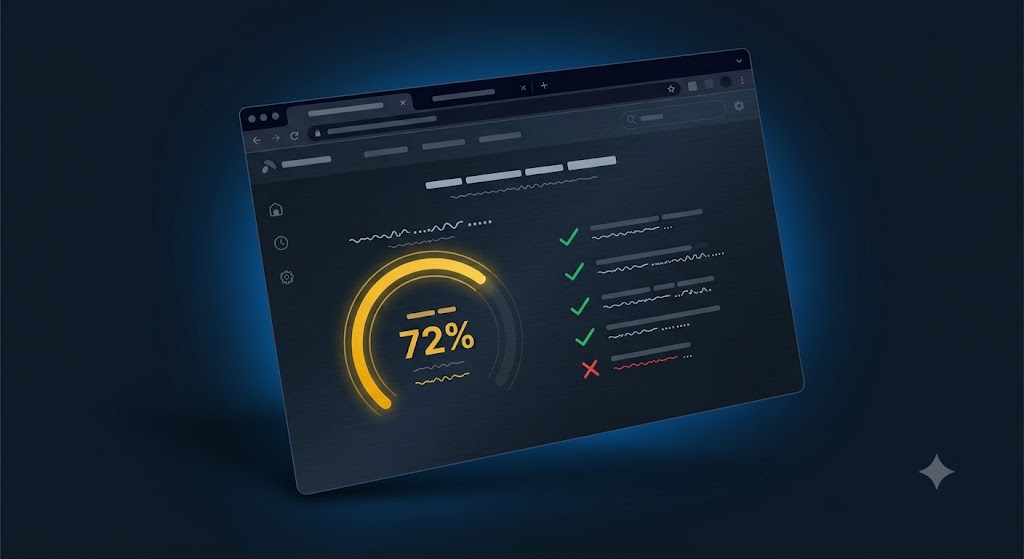
The audit returns a health score from 0 to 100. The number is only useful if you know what it means, so here is how to read it:
80 to 100 — Strong. The fundamentals are in place. Focus on content, local pages and conversion improvements.
60 to 79 — Needs work. Nothing is broken, but several fixable issues are costing you visibility and enquiries.
40 to 59 — Losing customers. Real problems with speed, mobile or search basics. Visitors are leaving before they contact you.
Below 40 — Urgent. The site is actively damaging your business. A rebuild is usually cheaper and faster than patching.
The score is weighted, so a failure on something critical like mobile usability or HTTPS pulls it down more than a missing alt tag. That is deliberate — it reflects what actually affects a customer's decision.
How to run your free website audit
Go to the free website audit page.
Enter your website address. No account, no card, no install.
Wait around 30 to 60 seconds while the checks run against your live site.
Review your health score and the summary of what was found.
Enter your email to receive the full report with the specific issues and recommended fixes.
The report is written in plain English. Where something is technical, it explains what it means for your customers rather than just naming the problem.
What to fix first
If your report comes back with a long list, work in this order. It is roughly the order of impact on enquiries:
Security. If browsers are warning people away, nothing else matters. Fix HTTPS first.
Mobile. Most local searches happen on a phone. If the site is unusable there, you are losing the majority of your traffic.
Contact paths. Make it possible to call, message or enquire from every page in one tap.
Speed. Compress images, remove unused scripts, and get the main content appearing quickly.
Page titles and local signals. Tell Google what you do and where you do it, on every page.
Trust content. Real reviews, real photos, clear service descriptions.
Most of these are hours of work, not weeks. If your score is below 40, however, the honest answer is usually that patching an old site costs more than replacing it — and Stars Web Studio will tell you that rather than sell you a maintenance retainer.
Frequently asked questions
Is the website audit really free?
Yes. The audit is completely free with no card details required. You enter your website address, the checks run, and you get your score and summary. Entering your email unlocks the full written report.
How long does the audit take?
Usually between 30 and 60 seconds. The tool crawls your homepage and key pages, runs performance tests, and generates the report automatically.
Do I need to be technical to understand the report?
No. The report is written for business owners, not developers. Every issue is explained in terms of what it means for your customers and what needs to happen to fix it. If you want to hand it to your existing developer, it works for that too.
What happens if my score is low?
A low score is useful information, not a verdict on your business. It usually means a handful of specific, fixable problems are stacking up. The report lists them in priority order so you can start with whichever will recover the most enquiries.
How often should I audit my website?
Every three months is a sensible rhythm for a small business site, and always after any significant change — a redesign, a hosting move, a new booking system, or adding a new service. Sites drift. Plugins update, images get uploaded at full size, and pages quietly break.
Will you try to sell me a website afterwards?
Stars Web Studio builds websites, so there is no pretending otherwise. But the audit is genuinely useful on its own, and plenty of people run it, fix the issues themselves, and never get in touch again. If you do want help, Stars Web Studio will build you a free demo of your site using your real business name and services before you commit to anything — you can see examples in the portfolio.
Check your website in under a minute
You cannot fix what you have not measured. If you have never looked at your website from a search engine's point of view, or from the point of view of a customer on a phone with two bars of signal, the audit will tell you something useful within the minute.
Run your free website audit now, or get in touch if you would rather talk it through first.