Salon Website Design UK: 12 Ways to Get More Bookings in 2026
Discover 12 practical salon website design improvements that can make it easier for UK clients to find your treatments, trust your business and book an appointment.
Article guide On this page
A beautiful salon website is not automatically a good salon website. If a potential client cannot quickly find your treatments, prices, location, reviews or booking button, an impressive design can still lose appointments.
For a UK hair salon, nail studio, beauty salon or aesthetics business, the website should answer four questions almost immediately: Do you offer what I need? How much does it cost? Can I trust you? How do I book?
The strongest salon websites are designed around that customer journey. Someone discovers the business through Google, Maps, social media or a recommendation, lands on the website, checks the relevant treatment, looks for proof, understands the price and then books with minimal friction.
This guide explains how to build that experience and highlights 12 areas salon and beauty business owners should review in 2026.
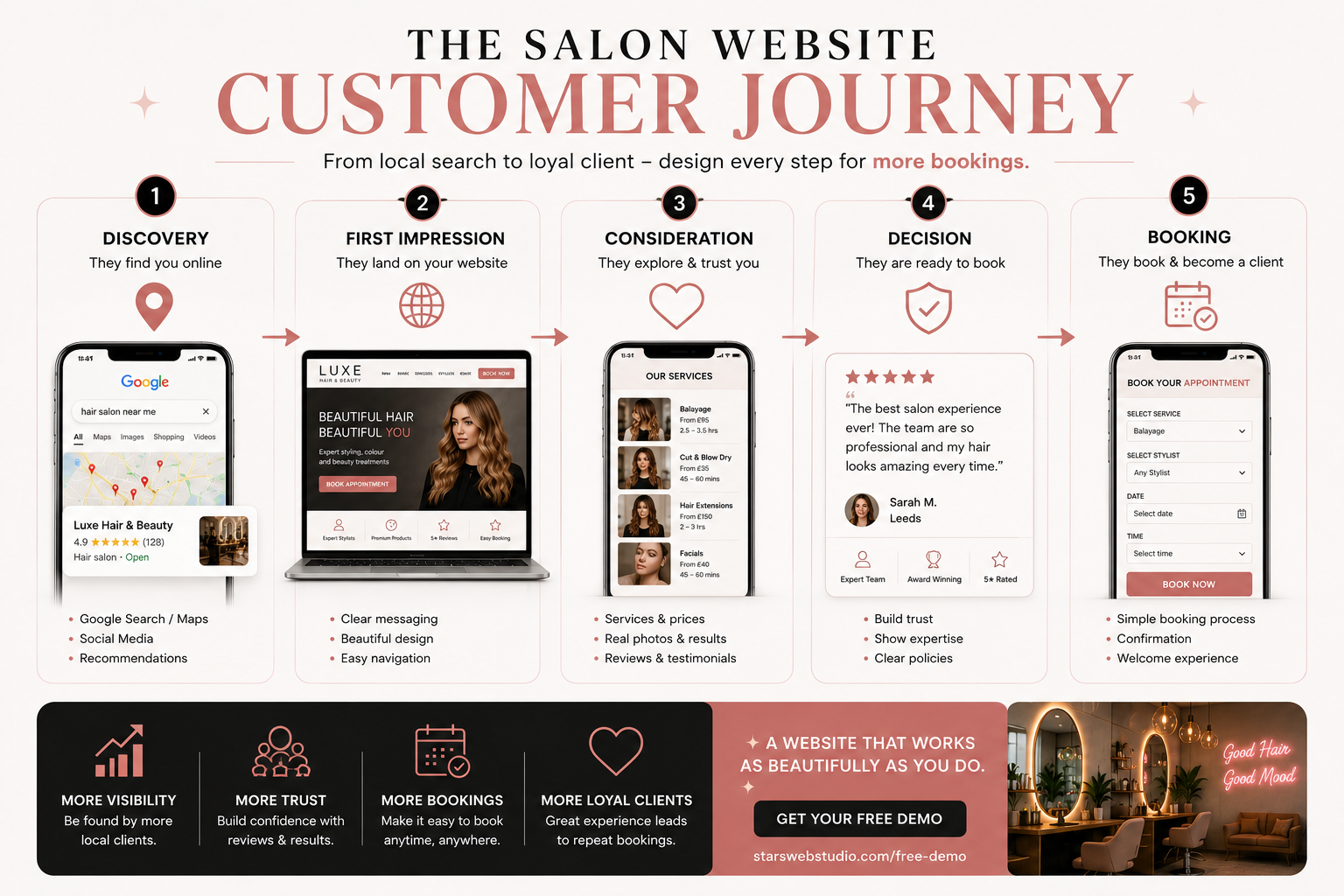 A booking-focused salon website connects discovery, treatment information, trust and appointment booking into one clear journey.
What should a good salon website include?
A useful salon website should make the information a new client needs easy to find without forcing them to search through several pages.
Clear salon name, positioning and location
Prominent Book Now or appointment actions
Services and treatments
Visible prices or meaningful starting prices
Appointment duration where useful
Stylist or practitioner information
Real salon and treatment photography
Genuine reviews and testimonials
Before-and-after examples where appropriate
Opening hours and address
Directions, parking or travel information
Telephone and contact options
Booking or enquiry functionality
Cancellation, deposit or consultation information where relevant
Fast mobile performance
Accessible navigation and forms
Privacy information appropriate to the data being collected
These elements may sound straightforward, but the way they are structured can make the difference between a website that simply presents the salon and one that actively supports bookings.
1. Make booking the main website journey
If appointments are the main commercial goal, booking should be one of the easiest actions on the website.
A common mistake is hiding the booking link inside the navigation or placing one button near the bottom of the homepage. Someone who already knows which treatment they want should not need to read the entire website before being able to book.
Consider placing booking actions in:
the main header;
the hero section;
individual treatment sections;
stylist profiles;
the contact section;
relevant calls to action throughout longer pages.
If your salon already uses Fresha, Treatwell, Booksy or another booking platform, you do not necessarily need to replace it. Your website can handle discovery, service information and trust before moving the client into your existing booking system.
The important part is making the transition obvious. Do not make visitors guess whether they should call, message, submit a form or click a third-party booking link.
2. Design for mobile clients first
Many salon customers discover businesses while using a phone. They may search for a treatment nearby, compare Google reviews, check Instagram and then open several salon websites before deciding where to book.
A desktop design that has simply been squeezed onto a smaller screen is not enough.
On mobile, test whether a visitor can comfortably:
open and close the navigation;
read service names and prices;
tap booking buttons without hitting another control;
view galleries without awkward scrolling;
complete an enquiry form;
tap the telephone number to call;
open directions;
find the address and opening hours;
move into the booking system without confusion.
Pay particular attention to the actual booking journey. A homepage can look excellent on mobile while the final booking step is difficult to use.
3. Show services and prices clearly
Clients often want to understand the likely cost before committing to an appointment. Hiding every price behind a phone call or consultation can create unnecessary friction.
If your pricing is fixed, show it clearly. If the final price depends on factors such as hair length, stylist level, treatment complexity or consultation, use a clear starting price and explain what may affect the total.
Instead of a service entry that simply says:
Balayage
a more useful listing might communicate:
Balayage — from £95
Approximate appointment time
Consultation requirement
What is included
Which stylists offer the treatment
A direct route to book or enquire
You are reducing uncertainty before the customer reaches the booking stage.
4. Give important treatments their own pages
A single Services page may be enough for a small salon with a limited menu, but commercially important treatments often benefit from their own detailed pages.
For example, a salon may create dedicated pages for:
balayage;
hair extensions;
bridal hair;
gel nails;
lash extensions;
facials;
permanent makeup;
specialist curly hair services.
A useful treatment page can explain:
what the service involves;
who it may be suitable for;
prices or starting prices;
appointment duration;
consultation requirements;
preparation or aftercare;
relevant team members;
frequently asked questions;
real examples of the salon's work;
the next booking step.
This is more useful to a client and also gives search engines clearer information about the specific services the business provides.
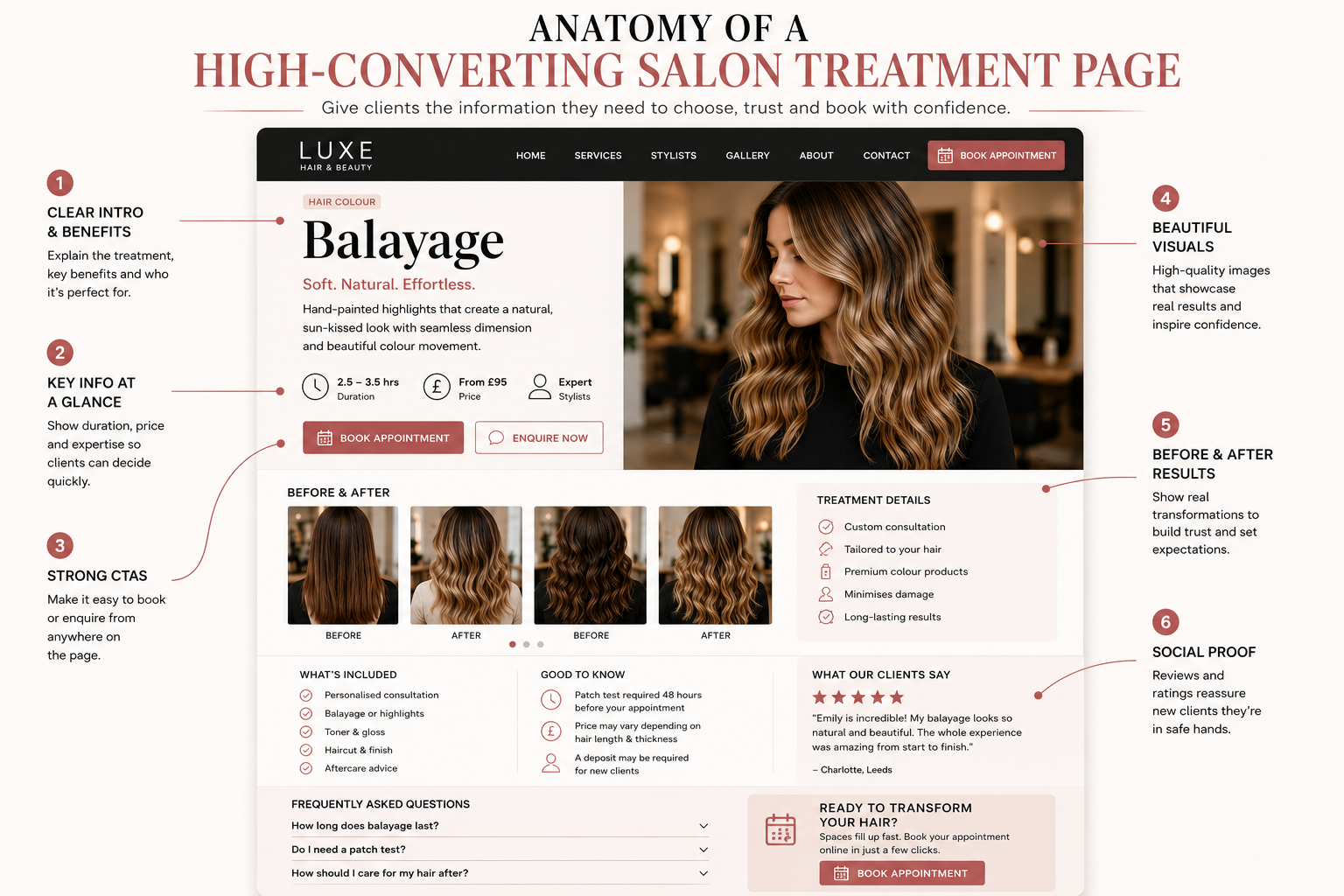 Important treatments deserve enough information to help a first-time client make a confident booking decision.
5. Build trust around your stylists and practitioners
In many beauty businesses, the client is not only choosing a salon. They are choosing the person who will perform the service.
A team section containing only names and photographs misses an opportunity to build confidence.
Where appropriate, stylist or practitioner profiles can include:
role;
experience;
specialist treatments;
techniques or styles they focus on;
professional qualifications where relevant;
examples of their work;
pricing level if it varies by team member;
a direct booking action.
For example, a new colour client may specifically want someone experienced in balayage, colour correction or blonding. Making that expertise visible reduces the need for the customer to telephone the salon just to find the right person.
6. Use real salon photography instead of generic stock images
Beauty businesses are visual, so photography is one of the strongest trust signals available to you.
Generic stock images might make a website look polished, but they do not show what your salon actually looks like or the quality of your real work.
Prioritise images of:
your actual salon interior;
your team;
real treatments;
finished results;
before-and-after examples where appropriate;
the reception or waiting area;
details that communicate the atmosphere clients can expect.
Your gallery should support a decision rather than simply fill space. A potential client considering nail art wants to see nail work. Someone researching colour services is more interested in relevant colour transformations than a generic photograph of scissors or shampoo bottles.
Make sure you have appropriate permission to use identifiable client images.
7. Put reviews close to important decisions
Reviews are often placed in one testimonial section near the bottom of a homepage. That is useful, but social proof can be stronger when it appears near the service it supports.
For example:
colour reviews can appear near colour services;
bridal testimonials can support bridal pages;
nail reviews can appear beside a nail gallery;
first-time client feedback can appear close to booking prompts.
This helps answer the concern a visitor is experiencing at that moment.
Use genuine reviews only. Do not create fictional testimonials or change the substance of customer feedback simply to make the website sound stronger.
8. Make your location impossible to miss
A local salon website should make it completely clear where the business is based.
Include accurate:
business name;
street address;
postcode;
telephone number;
opening hours;
directions;
map access;
parking information;
nearby landmarks or public transport information where useful.
These details help new customers and support the overall local-search picture around the business.
Your Google Business Profile and website should also present consistent business information. If your opening hours change, remember to update the relevant places rather than leaving contradictory information online.
9. Build pages around real local search intent
Local SEO is more than repeating a city name throughout a homepage.
A salon should clearly explain what it offers and where it operates. Depending on the business, a potential customer may search for combinations such as:
balayage in Manchester;
nail salon in Leeds;
lash extensions in Birmingham;
curly hair specialist in Bristol;
bridal hair in Glasgow;
beauty salon in Nottingham.
That does not mean creating dozens of nearly identical pages where only the town name changes. Each page should exist because it provides genuine value.
A strong local treatment page should combine the service, expertise, location, pricing, real work and booking information naturally rather than stuffing the same keyword into every paragraph.
If you want a broader explanation of why an owned website still matters for local businesses, read our guide to why every small business needs a professional website.
10. Do not let galleries and animations make the site slow
Salon websites can become heavy very quickly because visual design often involves large photographs, videos, galleries, review widgets, maps, booking software and animations.
The premium appearance of the site should not come at the cost of usability.
Common improvements include:
resizing photographs before uploading them;
compressing images;
using efficient image formats where appropriate;
lazy-loading images that are further down the page;
avoiding unnecessarily large background videos;
limiting heavy third-party widgets;
preventing images from shifting the page while loading;
loading booking scripts only where they are needed;
keeping animation purposeful rather than adding motion to every element.
A salon website can still feel luxurious, animated and modern while remaining lightweight.
Test performance on real mobile devices rather than judging the site only from a fast desktop connection.
11. Make premium design accessible
Many beauty websites use soft colour palettes, elegant serif fonts, thin typography and minimalist buttons. Those choices can create a premium visual identity, but they should not make the website difficult to use.
Review:
text contrast;
font size;
button size;
keyboard navigation;
visible form labels;
clear validation messages;
alternative text for meaningful images;
focus states;
navigation clarity.
A pale beige booking button on a slightly lighter beige background may fit the brand palette but fail its main job if visitors do not recognise it as an action.
Accessibility and conversion design often support each other. Clearer navigation, more readable text and easier forms improve the experience for a wider range of customers.
12. Review booking forms, cookies and client data
Think carefully about what information your website actually needs to collect.
A simple appointment enquiry may only require a name, contact details, treatment and preferred date. More specialised consultation forms can collect additional information depending on the service.
Health-related information can require additional care under UK data-protection rules. Avoid collecting sensitive information simply because a template includes the field.
You should also understand which tracking technologies your website uses. Analytics software, advertising pixels, embedded services and some third-party booking tools may affect your privacy and cookie requirements.
Your privacy information should describe your real website and business processes rather than being copied from an unrelated salon.
This article provides general website guidance and is not legal advice.
How should a salon website be structured?
There is no single layout that every salon must follow, but the following structure works as a useful starting point.
| Page | Main purpose | Useful content |
|---|---|---|
| Home | Explain the salon and guide the visitor | Main treatments, location, reviews, team highlights and booking actions |
| Services | Help clients compare options | Service categories, prices, durations and links to detailed pages |
| Treatment Pages | Answer booking questions | Process, suitability, price, FAQs, examples and booking |
| Team | Build practitioner trust | Experience, specialisms, portfolio and booking links |
| Gallery | Show real results | Real work organised around relevant services |
| Reviews | Provide social proof | Genuine customer experiences and relevant testimonials |
| Contact / Visit | Remove location uncertainty | Address, opening hours, map, parking, phone and directions |
| Policies | Set expectations | Deposits, cancellations, lateness, consultations and privacy information |
What should appear above the fold?
The first screen should not try to explain the entire business. Its job is to orient the visitor quickly.
A strong salon hero usually needs:
the salon name or clear brand identity;
a simple statement of what the salon specialises in;
the location;
one primary booking action;
strong real photography;
possibly a concise trust signal such as review strength, experience or specialist positioning.
Avoid filling the first screen with long paragraphs, several competing buttons and decorative animations that delay access to the actual services.
Does a salon need a website if it already uses Fresha or Treatwell?
For many salons, yes.
A booking platform is excellent at handling appointments, calendars and transactions. Your own website can perform a different role.
It gives you space to explain:
your brand;
your individual treatments;
your location;
your team;
your expertise;
your policies;
your results;
frequently asked questions;
local information;
why a client should choose your salon.
The website can then send a ready-to-book visitor into Fresha, Treatwell, Booksy or whichever appointment platform the business already uses.
Think of your website as the discovery and decision layer and the booking platform as the appointment layer.
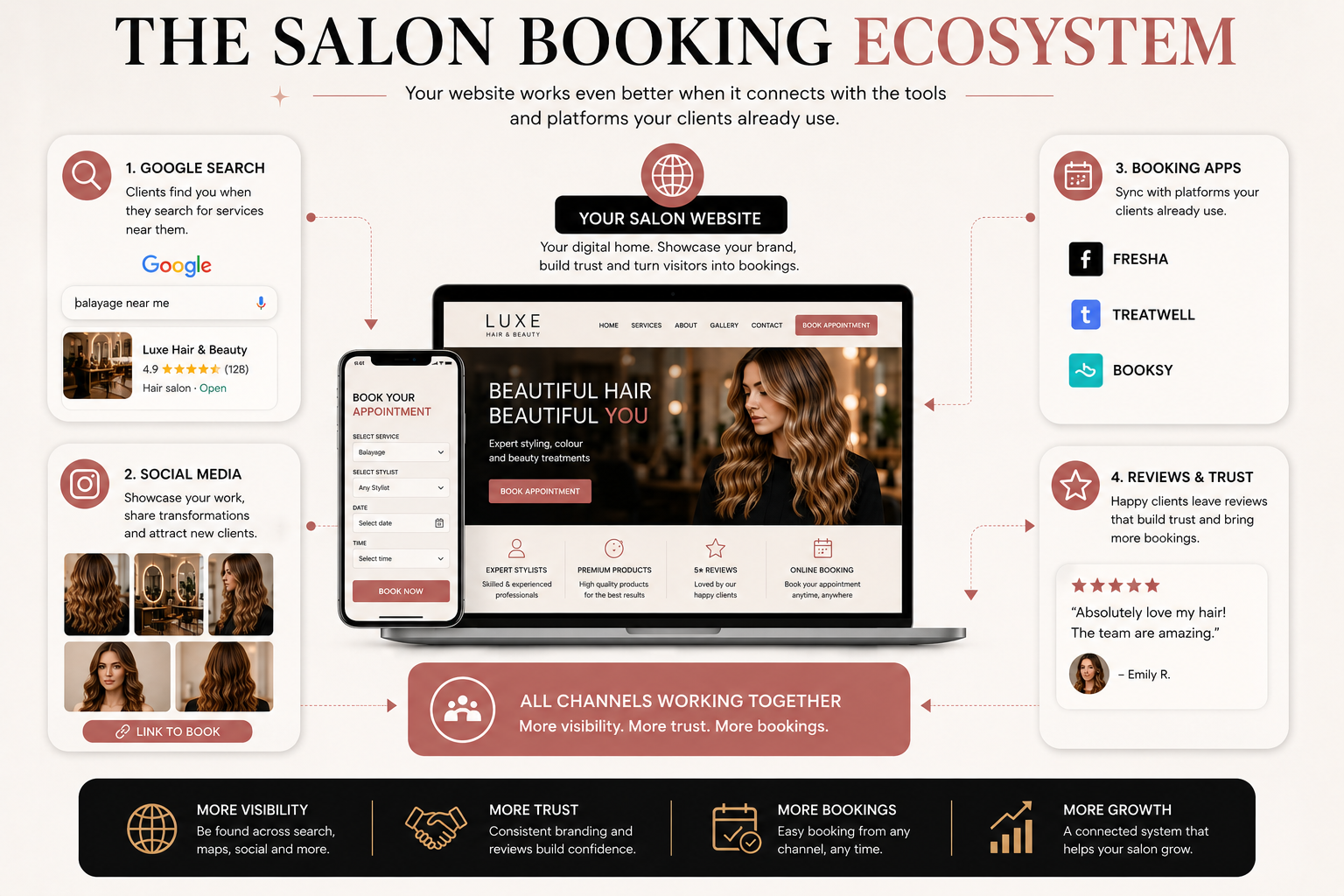 Your website and booking platform can work together: the website builds visibility and confidence, while the booking system handles the appointment.
A practical example of a booking-focused salon website
Stars Web Studio recently created a salon website concept for AK Nails & Beauty in Leeds.
The project combines a full service and price menu, nail gallery, client reviews, an appointment enquiry form, WhatsApp booking, location information and a mobile-first layout.
The important part is not the specific visual style. It is how the information is organised around the questions a potential beauty client is likely to have before booking.
You can also view more Stars Web Studio website projects to see how different local-business websites can be structured around their own customer journeys.
Salon website design checklist
Booking: Can a ready-to-book customer reach the booking step immediately?
Mobile: Can someone browse treatments and book comfortably on a phone?
Services: Are your main treatments clearly explained?
Pricing: Can clients understand the likely cost before contacting you?
Team: Can visitors identify the right stylist or practitioner?
Photography: Does the site show your actual salon and real work?
Reviews: Are genuine testimonials visible near important decisions?
Location: Are your address, postcode, opening hours and directions obvious?
Local SEO: Does the website clearly explain what you offer and where you are based?
Performance: Are images, video, booking scripts and widgets properly optimised?
Accessibility: Are text, buttons, menus and forms easy to use?
Privacy: Are you collecting only the information you genuinely need?
Frequently asked questions about salon websites
What makes a good salon website?
A good salon website makes treatments, prices, location, trust signals and booking easy to understand. It should work well on mobile, use real salon content, load quickly and guide visitors towards the correct next step.
Should salons display prices online?
In most cases, displaying prices or meaningful starting prices makes the decision process easier for potential clients. If pricing varies, explain the main factors that can affect the final cost.
Should every treatment have its own webpage?
No. Dedicated pages are most useful for important treatments that need additional explanation or have meaningful customer search demand. Smaller services can remain grouped in a clear service menu.
Can a salon website link directly to Fresha or another booking system?
Yes. Your website can explain services, build trust and attract local visitors before directing customers to the relevant appointment page in your preferred booking platform.
How can a salon website help with local SEO?
A salon website can clearly communicate the business location, services, team, opening hours and treatment information. Useful service pages, consistent business information, strong internal linking and a properly maintained Google Business Profile can all support local visibility.
Do salons need separate pages for different towns?
Not automatically. Avoid creating large numbers of nearly identical location pages just to target keywords. Create a location page only when there is genuine information and value for customers in that area.
How much information should be on a treatment page?
Include enough information for a first-time client to understand the service and make the next decision. That often means the treatment process, price, duration, suitability, preparation, relevant team members, examples, FAQs and booking action.
Your salon website should help clients make a decision
The best salon website is not necessarily the one with the most animations, the most pages or the most expensive visual effects.
It is the one that makes it easy for the right client to discover the salon, understand the treatments, see the quality of the work, trust the team and move confidently towards an appointment.
Start with those fundamentals and then build the visual identity around them.
If your current website looks dated, is difficult to use on mobile or does not give potential clients a clear path to book, our website design and redesign services can help you plan a stronger customer journey.
Not sure what a redesigned salon website could look like? Request a free website demo from Stars Web Studio, or contact us to discuss your salon, treatments and current booking setup.