Website Hosting and Maintenance for Small Businesses: Complete 2026 Guide
A complete international guide to secure website hosting, tested backups, maintenance schedules, monitoring and support for small businesses in the UK, Europe and US.

Article guide On this page
Website hosting and maintenance should keep a small-business website available, secure, recoverable and useful long after launch. Hosting provides the infrastructure that serves the site. Maintenance covers the continuing work around software updates, backups, monitoring, forms, integrations, performance and technical support.
For businesses serving customers in the United Kingdom, Europe and the United States, the core responsibilities are remarkably similar. The regional details change, but every reliable website needs documented ownership, controlled access, tested recovery and a clear response route. Our website hosting and maintenance service brings those responsibilities into one practical care plan.
Why hosting alone is not a maintenance plan
A hosting package can keep website files on a server and may include server-level security, a certificate and automated snapshots. It does not automatically mean that someone is updating the website application, checking vulnerable extensions, testing enquiry forms, reviewing integrations or proving that a backup can be restored.
Maintenance closes that operational gap. It turns a collection of accounts and technical tasks into a repeatable process with named owners, schedules, escalation routes and evidence that important checks have been completed.
The outcomes every website care plan should protect
Availability: the domain, DNS, certificate and hosting stay active and monitored.
Security: access is controlled, software remains supported and vulnerabilities are handled promptly.
Recoverability: versioned backups are protected, retained appropriately and restoration-tested.
Business performance: pages remain responsive, forms work, tracking is reliable and search engines can crawl the site.
These outcomes work as one system. Fast hosting cannot compensate for an expired domain. A daily backup is not useful if nobody knows how to restore it. An uptime alert does not help when the page loads but the booking or payment journey is broken.
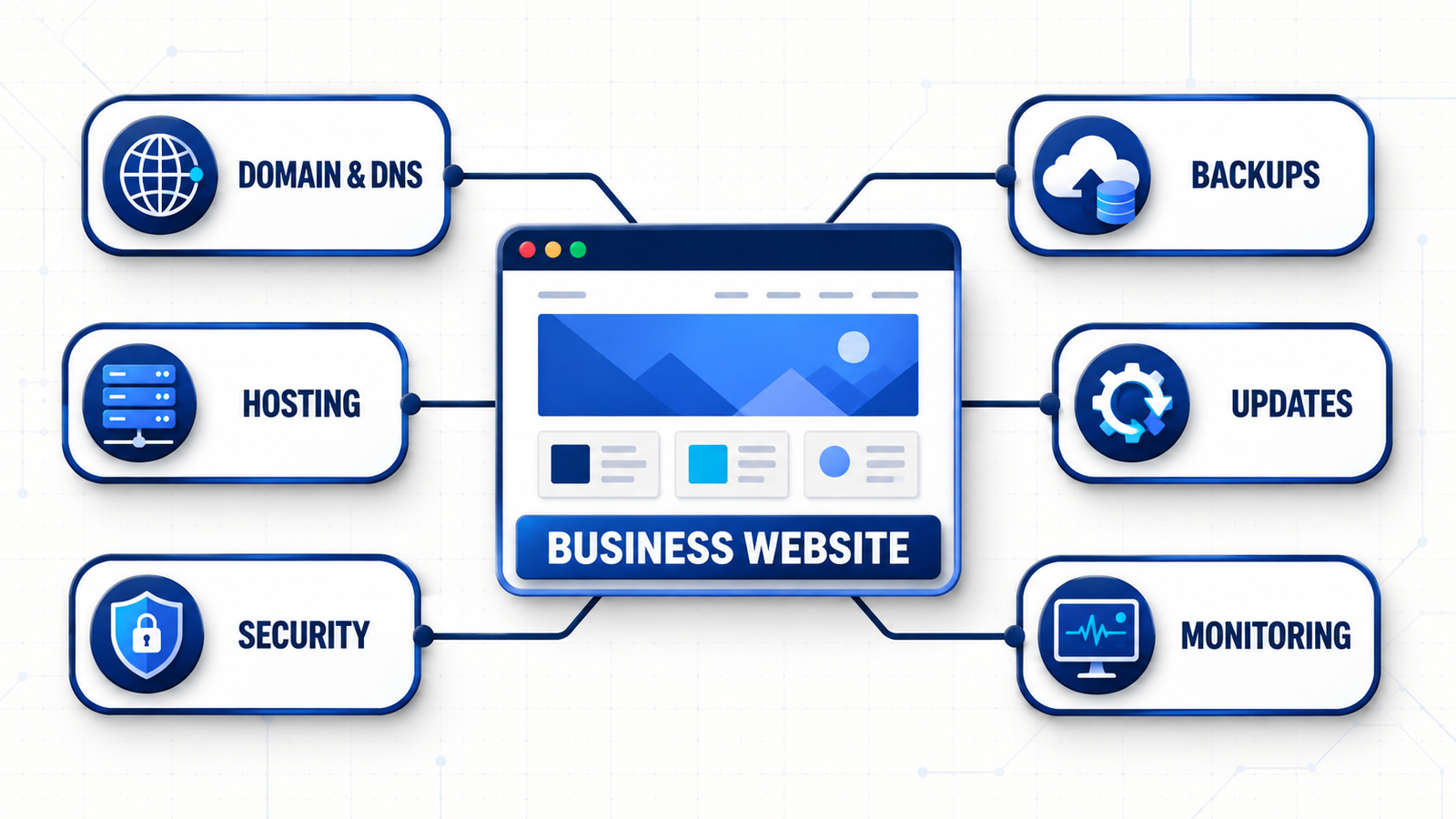
What a complete hosting and maintenance plan should include
1. Business ownership of the domain and critical accounts
The business should normally remain the registrant of its domain and retain ultimate control of hosting, DNS, analytics and other essential accounts. Record the registrar, renewal date, DNS provider, name servers, account owners and recovery contacts. Use multi-factor authentication and avoid making recovery dependent on one employee or supplier.
An agency can manage technical settings, but the agreement should define ownership and include a practical handover route. Losing access to a domain can interrupt the website, business email and connected services at the same time.
2. Hosting selected for the application and audience
Choose infrastructure for the website platform, traffic, storage, database activity, integrations and commercial importance—not only the introductory price. Ask where the primary workload and backups run, whether a content delivery network is included, which resource limits apply and when support is available.
A brochure website, appointment platform and online store have different requirements. A site accepting orders or leads throughout the day usually needs more frequent backups and closer transaction monitoring than a mostly static site.
3. Backups designed around a usable recovery
A practical backup plan should document:
which files, databases, uploads and configuration are protected;
how often backups run and how long versions are retained;
whether a protected copy is separated from the live environment;
who may authorize a restore and how identity is verified;
the acceptable recovery point and recovery time; and
the date and outcome of the latest test restoration.
The UK National Cyber Security Centre, the US Federal Trade Commission and European Union Agency for Cybersecurity all include backups and recovery among their practical recommendations for smaller organizations. Frequency should follow how quickly valuable data changes, while testing confirms that the backup can actually be used.
4. Safe software and dependency updates
Content-management systems, plugins, themes, frameworks and server packages change continually. Updates may close known vulnerabilities, but an untested change can break a layout, form, checkout or integration. Back up first, assess the change, use a staging environment for higher-risk work, test priority journeys and retain a rollback route.
Unsupported components should be replaced instead of being ignored. The plan should state who monitors advisories, how quickly urgent patches are reviewed and which changes require separate approval.
5. Security and administrator access
Use individual administrator accounts, multi-factor authentication, least-privilege roles and a documented process for removing former staff and suppliers. Review third-party access and know what information website forms collect, where it is sent, how long it is retained and who can retrieve it.
Encryption, strong authentication and limited access are common foundations across regions. Specific privacy, contractual and industry requirements vary, so maintenance should support compliance work without being presented as legal advice or a guarantee of compliance.
6. Monitoring the customer journeys that create value
Homepage uptime is not enough. Test quote forms, bookings, payments, account login, confirmation messages, downloads and delivery to the intended inbox or CRM. Include mobile journeys, validation errors and the most common customer formats for addresses and telephone numbers.
Define what counts as critical, who receives alerts, who investigates and what happens outside ordinary support hours. Monitoring is valuable only when it leads to a clear response.
7. Performance, search visibility and analytics
Hosting influences speed, but image weight, scripts, database growth, themes and third-party tools matter too. Review real page templates, Core Web Vitals, broken links, crawl errors, redirects, Search Console messages and analytics collection.
For multi-regional or multilingual sites, use separate URLs where appropriate, make the page language obvious and connect equivalent regional versions correctly. Our SEO and Google visibility service can support deeper work when routine monitoring reveals a broader search or content opportunity.
Regional considerations for the UK, Europe and the US
United Kingdom
UK businesses should consider the UK GDPR security principle, their data processors, international data transfers and the information collected through forms, analytics and third-party services. The Information Commissioner’s Office describes a risk-based approach to appropriate technical and organisational safeguards, including the ability to restore access after an incident.
Hosting in the UK can help with latency or commercial preferences, but location alone does not establish security or compliance. See our detailed UK website hosting and maintenance guide.
Europe
The European market includes many countries, languages and customer expectations. Organizations subject to the GDPR should understand what personal data the website processes, the legal and contractual roles of suppliers, retention, safeguards and relevant cross-border data flows. National and sector-specific rules may add further requirements.
A European strategy may also need language-specific content, regional support coverage and performance testing from the places customers actually use the site. Avoid creating thin country pages that only change a place name; each localized page should provide genuine regional value.
United States
US requirements can vary by state, sector, contract and the type of information processed. The Federal Trade Commission’s small-business guidance recommends regular software updates, backups, multi-factor authentication, limited access and an incident response plan.
Document where systems and backups run, which support hours cover customers across US time zones and how critical incidents are escalated. See our detailed US website hosting and maintenance guide.
Other international markets
The same framework can be adapted for other regions while respecting local requirements and customer behaviour. We also maintain guides for Canada and Australia.
A practical website maintenance schedule
Continuous or daily automated checks
Website availability, DNS resolution and certificate expiration.
Backup completion, security alerts and resource limits.
Critical errors and priority transaction availability.
Weekly checks
Review software updates and vulnerability notifications.
Test the primary enquiry, booking or purchase journey.
Investigate failed jobs and unusual administrator activity.
Monthly checks
Apply planned updates after backup and appropriate testing.
Review performance, broken links, analytics and Search Console.
Confirm key offers, contact details and operating information.
Remove unneeded users, plugins and integrations.
Quarterly checks
Perform a test restoration or documented recovery exercise.
Review accounts, suppliers, integrations and data flows.
Test mobile usability, accessibility and high-value journeys.
Review storage, traffic and performance trends.
Annual checks
Confirm domain, hosting, certificate and licence renewals.
Review registrant details, recovery contacts and supplier access.
Reassess hosting regions, contracts and recovery objectives.
Audit ageing content and decide whether focused work or a website redesign is needed.
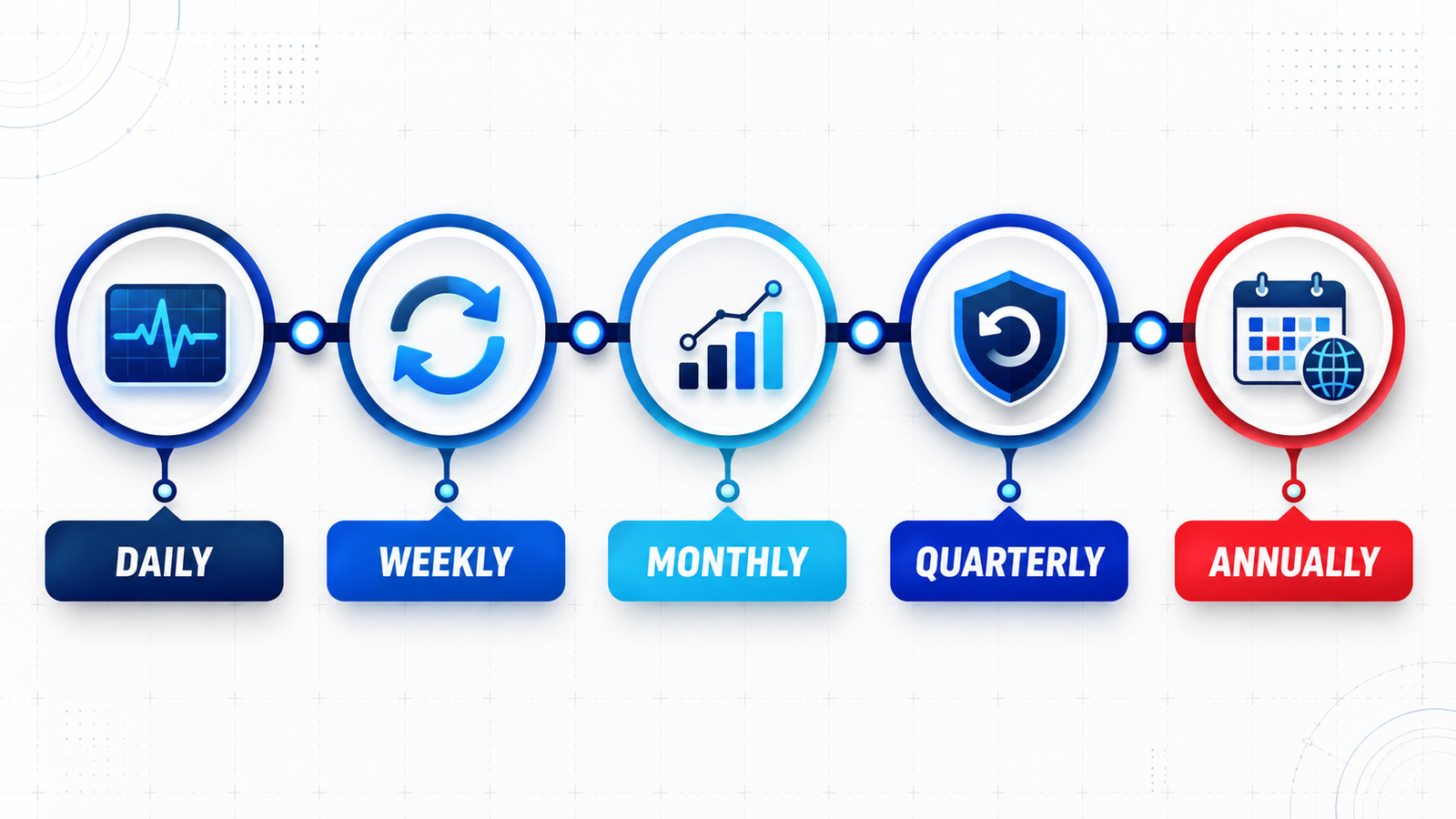
Managed maintenance or an internal process?
An internal process can suit a simple website when a named person has the time, access and skills to test updates and complete a recovery. It becomes fragile when documentation is missing, backups are assumed rather than tested or nobody is available when a customer journey fails.
Managed maintenance is often more suitable when the website generates regular enquiries, supports bookings or sales, processes personal information, relies on custom integrations or needs a defined response route. The business should still retain ownership, reporting visibility and a clear exit path.
What affects hosting and maintenance cost?
Pricing depends on the platform, traffic, storage, backup frequency, update complexity, monitoring depth, response targets, included content changes, regional coverage and the business impact of downtime. E-commerce, membership and booking systems usually require more testing than brochure websites.
Ask for a written scope. Confirm whether the price includes the domain, certificate, CDN, email, licences, staging, malware response, restoration, reporting, taxes and after-hours support. Two services described as managed hosting may cover very different responsibilities.
How to choose a hosting and maintenance provider
Will our business retain ownership of the domain and essential accounts?
Where will the live website and backups operate?
Exactly what will be monitored, updated and tested?
How often are backups retained and restoration-tested?
What happens after a security, uptime or form-delivery alert?
Which response targets and routine content changes are included?
How are administrator credentials protected and returned?
How can the service be transferred to another supplier?
Changing hosting without avoidable SEO disruption
Google’s guidance for changing hosting recommends preparing and testing the new infrastructure, changing DNS, monitoring traffic and retaining the old environment until the move is confirmed.
Copy and test pages, media, forms, downloads and integrations.
Keep existing URLs unless a separate migration plan covers changes.
Preserve analytics and Search Console verification.
Check HTTPS, redirects, robots rules, canonicals and sitemaps.
Monitor server errors, crawling, traffic and enquiries after launch.
Keep a rollback route and do not cancel the old host too early.
Frequently asked questions
What is the difference between hosting and maintenance?
Hosting provides the infrastructure that makes a website available. Maintenance is the ongoing work that keeps the application updated, monitored, backed up, tested and supported. A care plan may combine both.
Does a global business need hosting in every target country?
Not necessarily. Audience location, latency, architecture, content delivery, contracts, data flows and regulatory obligations all influence the decision. A well-configured CDN may improve delivery across regions, but the full system still needs testing.
How often should a small-business website be backed up?
Match backup frequency to the rate at which valuable data changes. Define an acceptable recovery point and recovery time, then prove the plan with test restores.
Can maintenance prevent every breach or outage?
No provider can promise zero incidents. Good maintenance reduces avoidable exposure, detects problems earlier and makes recovery faster and more controlled.
Does maintenance improve SEO?
It does not guarantee rankings, but it protects technical foundations such as availability, HTTPS, crawlability, working links, mobile usability and performance.
Who should own the domain?
The business should normally remain the registrant and retain ultimate control. A supplier can manage technical settings while ownership, renewal and recovery details stay documented and accessible.
Turn website care into a documented business process
A business website should not depend on one person’s memory or an unread renewal notice. Document the accounts, automate routine checks, test recovery and assign a clear owner to every critical task.
If you want your current setup reviewed, discuss website care with Stars Web Studio. We can assess the domain, hosting, platform, backups, regional requirements and support needs, then define a practical scope.