Website Hosting and Maintenance for US Small Businesses: What a Care Plan Should Include in 2026
A practical US guide to managed website hosting, security updates, tested backups, performance monitoring and reliable support for small businesses.

Article guide On this page
Website hosting and maintenance keeps a small-business website available, secure, recoverable and useful after launch. Hosting supplies the infrastructure; maintenance covers the ongoing work around software updates, backups, monitoring, performance, integrations and technical support. A dependable care plan combines both and makes ownership clear.
For a US small business, the useful question is not only “Where is our website hosted?” It is “Who owns the domain, who controls DNS, who receives alerts, how quickly can we restore the site, and who tests the customer journey?” Our website hosting and maintenance service brings those responsibilities into one documented plan.
Why hosting alone is not a maintenance plan
A hosting package can keep files on a server, but it does not automatically maintain the website application. Depending on the provider, hosting may include server-level protection and automated snapshots while leaving content-management updates, vulnerable plugins, broken forms, expired integrations and restore testing to the business.
Maintenance closes that operational gap. It creates a repeatable routine for reviewing changes, testing updates, responding to alerts and recovering from failure before a small issue becomes lost leads, interrupted bookings or a prolonged outage.
The four parts of dependable website care
Availability: appropriate infrastructure, DNS, TLS/SSL, uptime monitoring and a clear incident route.
Security: controlled administrator access, supported software, tested updates and prompt vulnerability response.
Recoverability: automatic versioned backups, suitable retention and a restoration process that is tested.
Performance: checks on speed, forms, mobile usability, broken links, analytics and search visibility.
These responsibilities work as one system. A fast server cannot compensate for an expired domain, and a backup is valuable only when the right version can be restored within an acceptable timeframe.
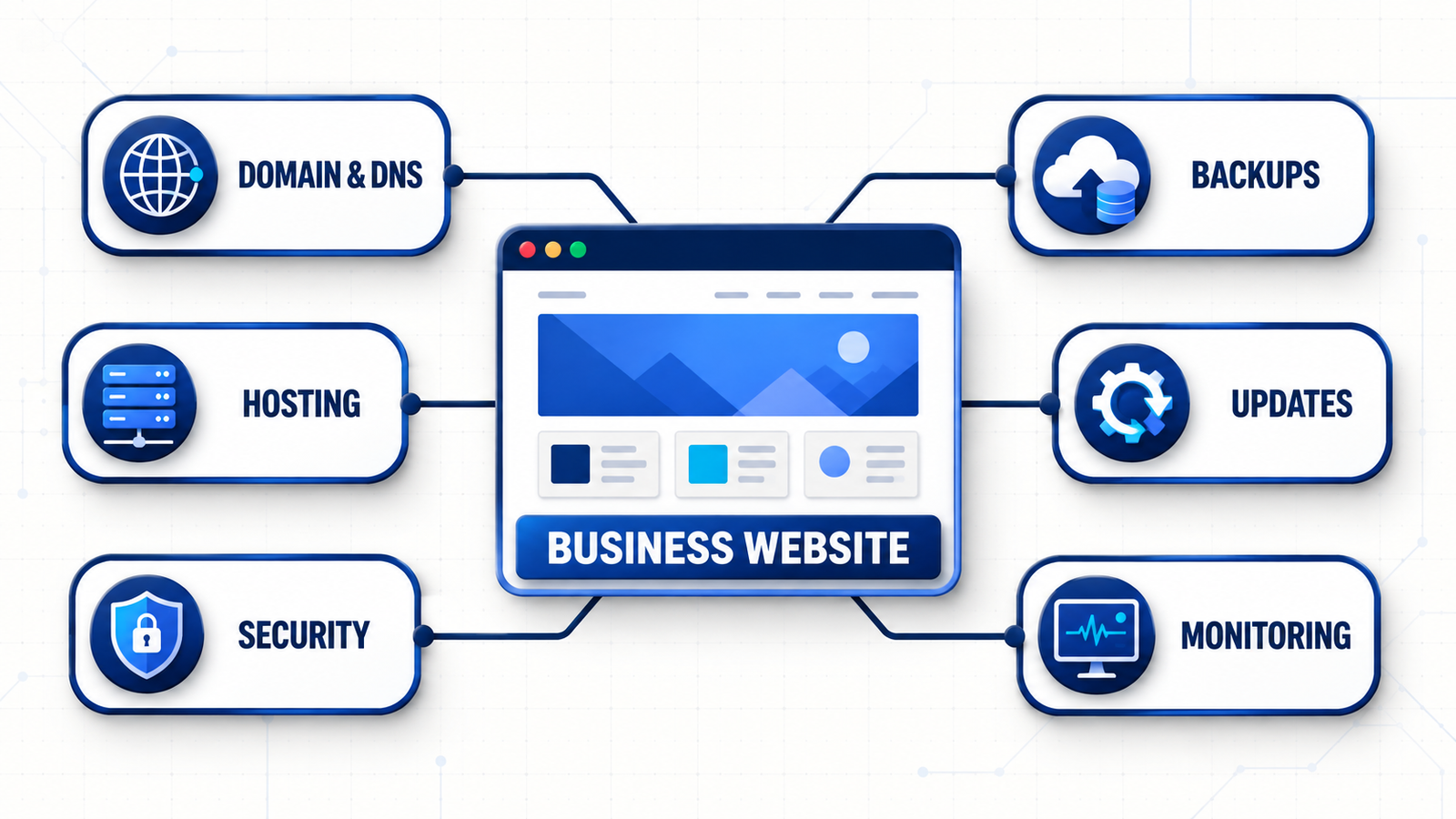
What a US website hosting and maintenance plan should include
1. Business ownership of the domain and DNS
The business should be the registrant of its domain and know which account, email address and payment method control renewal. Record the registrar, renewal date, DNS provider, authoritative name servers and recovery contacts. Use multi-factor authentication and keep recovery access with more than one trusted business owner.
An agency can manage technical records, but the company should retain ultimate control. A domain problem can disrupt the website, business email and third-party services at the same time.
2. Hosting matched to the website and its audience
Select hosting for the actual platform, traffic, storage, database activity and commercial importance of the site—not only the promotional price. Ask where the workload runs, whether a content delivery network is included, what resource limits apply, how traffic spikes are handled and which support hours cover your customers.
A brochure site, appointment platform and online store have different recovery needs. A site that accepts orders or captures leads throughout the day usually needs more frequent backups and closer transaction monitoring than a mostly static site.
3. Backups that can be restored
The Cybersecurity and Infrastructure Security Agency’s small-business resources include regular backups among core protections. A practical website plan should document:
which files, databases, uploads and configuration are backed up;
how often backups run and how long versions are retained;
whether a protected copy is isolated from the live environment;
who may request a restore and how identity is verified; and
the date and result of the latest test restoration.
Backup frequency should follow how quickly important data changes. A store receiving orders every hour has a different recovery point from a brochure site updated twice a year.
4. Safe software and dependency updates
Content-management systems, plugins, themes, frameworks and server packages change continuously. Updates can close known vulnerabilities, but an untested update may break a form, checkout or layout. Back up first, review the change, use a staging copy for higher-risk work, test priority journeys and keep a rollback path.
Unsupported or abandoned components should be replaced. The care plan should state who watches for advisories, how quickly critical updates are assessed and which changes require client approval.
5. Security and access controls
The Federal Trade Commission’s Cybersecurity for Small Business guidance recommends software updates, regular backups, strong authentication, encryption and limited access to sensitive data. Apply those ideas to the website: give each administrator an individual account, require MFA where available, use least-privilege roles, remove former staff promptly and review vendor access.
Requirements vary by industry and state, so a care plan is not a substitute for legal or compliance advice. It should, however, identify what customer data the website collects, where it is stored and who can access it.
6. Uptime, forms and customer-journey monitoring
An uptime alert can say the homepage is online while a quote form, booking flow, payment step or email notification is failing. Monitoring should cover the journeys that create business value, including mobile navigation, form validation, confirmation messages and delivery to the correct inbox or CRM.
Define who receives an alert, what counts as urgent, which team investigates and how customers are informed if a critical function is unavailable.
7. Performance, SEO and business-email health
Server response matters, but image weight, scripts, database growth and third-party tools also affect speed. Review Core Web Vitals, slow templates, broken links, crawl errors, redirects, analytics and unexpected indexing changes. Our SEO and Google visibility service can support deeper work when routine checks reveal a larger search issue.
If the same provider also supports domain email, clarify responsibility for SPF, DKIM and DMARC. The FTC’s hosting guidance specifically encourages businesses to ask about these email-authentication controls.
8. Data breach notification: a state-by-state patchwork
The United States has no single federal law requiring breach notification. Instead, all 50 states, Washington D.C. and several US territories each have their own data breach notification statute, and coverage depends on whose data you hold, not where your business is registered. If your website collects names, emails or payment details from a visitor in another state, that state's law can apply to you regardless of where your company is based.
Deadlines vary by state: some set a fixed window, such as the 30-day deadline California introduced from January 1, 2026 (joining Colorado, Florida and Washington), while most other states use looser language like "without unreasonable delay." A practical care plan should document which states your customer data touches and keep a response process ready that meets the strictest deadline among them, rather than assuming one national rule covers you.
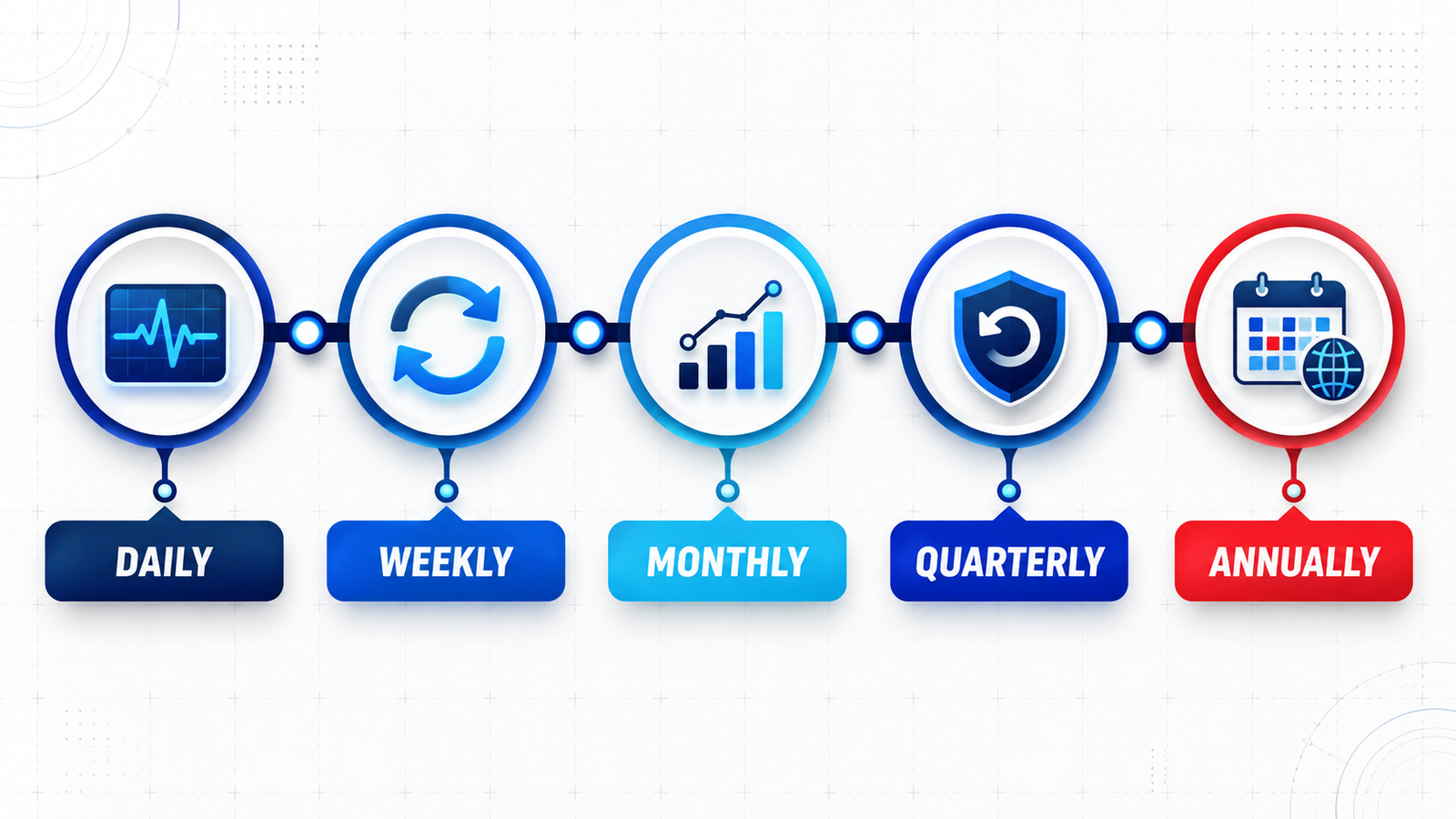
A sensible website maintenance schedule
Continuous or daily automated checks
Uptime, TLS/SSL expiration and critical page monitoring.
Backup completion, security alerts and resource-limit warnings.
Basic checks for priority forms, checkout or booking availability.
Weekly checks
Review software and dependency updates.
Test the most important lead, booking or purchase journey.
Investigate alerts, failed jobs and unusual administrator activity.
Monthly checks
Apply planned updates after backup and appropriate testing.
Review speed, broken links, Search Console messages and analytics collection.
Confirm key offers, contact details and operating information remain accurate.
Remove access and integrations that are no longer required.
Quarterly checks
Complete a test restoration or documented recovery exercise.
Review plugins, integrations, administrator accounts and unused components.
Test mobile usability, accessibility and high-value customer journeys.
Review traffic, storage and performance trends before limits become urgent.
Annual checks
Confirm domain, hosting and software renewals.
Review account ownership, recovery details and supplier contacts.
Assess whether the platform and hosting plan still fit the business.
Audit aging content and decide whether focused improvements or a website redesign are needed.
Managed maintenance or DIY?
DIY maintenance can suit a simple website when someone in the business has the time, access and confidence to test changes and restore backups. It becomes risky when responsibilities are informal, backups are assumed rather than verified, or nobody is available when a revenue-producing journey fails.
Managed maintenance is often a better fit when the website generates regular leads, supports bookings or sales, stores personal information, uses custom integrations or needs a defined response route. The value is not just a task count; it is ownership, tested procedures and informed decisions when something changes.
What affects hosting and maintenance cost in the US?
Cost depends on the platform, traffic, storage, backup frequency, update complexity, monitoring depth, response targets, included content work and commercial impact of downtime. E-commerce, membership and booking sites generally require more testing than brochure sites.
Ask for a written scope. Confirm whether the quoted price includes the domain, TLS certificate, CDN, email, licenses, staging, malware response, restores, reporting and after-hours support. Two plans called “managed hosting” may cover very different responsibilities.
How to change hosting without avoidable SEO problems
Google’s guidance for changing hosting infrastructure recommends preparing and testing the new environment, changing DNS, monitoring traffic and retaining the old infrastructure until the move is confirmed.
Copy and test pages, images, forms, downloads and integrations.
Keep existing URLs unless a separate migration plan covers URL changes.
Preserve analytics and Search Console verification.
Confirm HTTPS, redirects, robots directives and sitemaps.
Monitor server errors, crawling, traffic and enquiries after launch.
Keep a rollback plan and do not cancel the old service too early.
Questions to ask a US hosting and maintenance provider
Will our company retain ownership of the domain and website accounts?
Exactly what will you monitor, update and test?
How often are backups taken, retained and restoration-tested?
Are significant changes tested away from the live website?
What happens after a security, uptime or form-delivery alert?
Which response times and content changes are included?
How are administrator credentials protected and returned?
How can the service be transferred to another provider?
Frequently asked questions
What is the difference between hosting and maintenance?
Hosting is the infrastructure that makes the website available. Maintenance is the ongoing work that keeps the application updated, monitored, backed up, tested and supported. A care plan may combine both.
Does maintenance improve SEO?
It does not guarantee rankings, but it protects technical foundations such as availability, HTTPS, crawlability, working links, mobile usability and performance.
How often should a business website be backed up?
Match frequency to how often valuable data changes. A busy store or booking site may need frequent database backups, while a static site may need less. Retention and tested restoration matter as much as frequency.
Can maintenance prevent every hack or outage?
No honest provider can promise zero incidents. Good maintenance reduces avoidable risk, detects problems earlier and makes recovery faster and more controlled.
Can an agency maintain a website it did not build?
Often yes, after reviewing hosting, code quality, licenses, administrator access, integrations, backups and known issues. Urgent risks may need to be stabilized before routine care begins.
Should the agency own our domain?
The business should normally remain the registrant and retain ultimate control. The agency can manage technical settings, but ownership, renewal and recovery details should stay documented and accessible.
Turn website care into a defined business process
A business website should not depend on one person’s memory or a forgotten renewal notice. Document the accounts, automate routine checks, test recovery and assign an owner to every critical task.
If you want your current setup reviewed, discuss website care with Stars Web Studio. We can assess the domain, hosting, platform, backups and support requirements, then define a practical scope.